Facebook API Posting: Integration Guide
Understanding permissions, app review, video uploads, and API endpoints for Facebook Page publishing.
Before you start: Business verification and app review
Before your app can publish to Facebook Pages in production, you must complete two steps:
- Business Verification - Meta requires verification of your business identity before you can access Advanced Access permissions
- App Review - Each permission requires a separate app review with its own detailed screencast demonstrating how your app uses that specific permission
The review process takes 2-4 weeks per Meta’s documentation. Each screencast must show the complete user journey for that permission in your app.
Required permissions
To publish posts to a Facebook Page, your app needs the following permissions approved:
pages_manage_posts- Create and publish postspages_show_list- Access list of Pagespages_manage_engagement- Manage comments and interactionspages_read_user_content- Read user-generated contentread_insights- Access Page analytics
Each of these permissions needs its own app review submission with a screencast.
Page access tokens
The person requesting the Page access token must be able to perform the CREATE_CONTENT, MANAGE, and MODERATE tasks on the Page.
Page access tokens can be made non-expiring by requesting them through the /{user-id}/accounts endpoint with a long-lived user access token.
Here’s sample Graph API Explorer request to get a page access token:
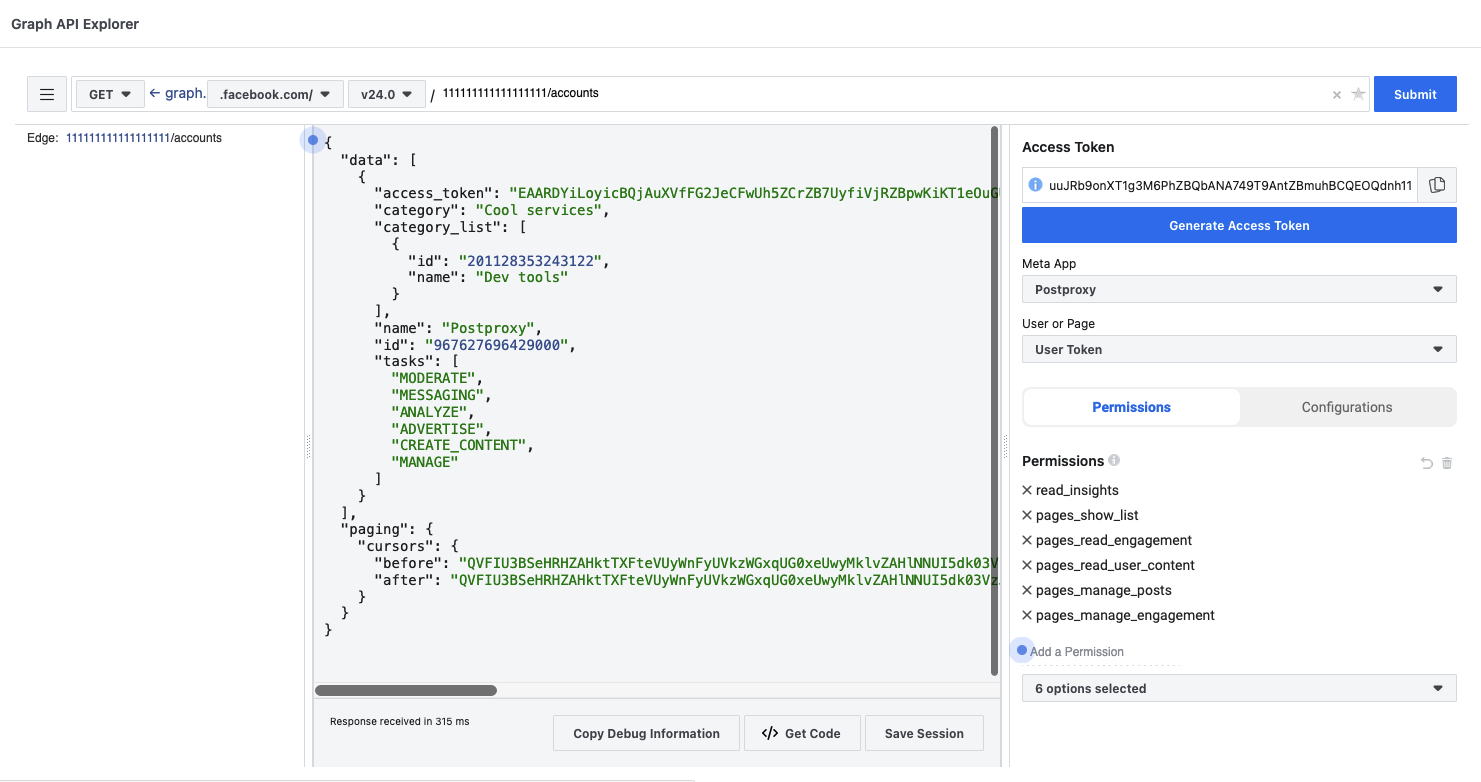
It’s helpful to use Graph API Explorer to test your permissions and get a feel for the API before integrating it into your app.
Publishing text and link posts
POST to /{page-id}/feed:
{ "message": "your_message_text", "link": "your_url", "published": "false", "scheduled_publish_time": "unix_timestamp"}The scheduled_publish_time must be between 10 minutes and 30 days from the request time. It accepts:
- Integer UNIX timestamp in seconds
- ISO 8061 timestamp string
- PHP strtotime() parsable string (e.g., “+2 weeks”, “tomorrow”)
Publishing photos
POST to /{page-id}/photos:
{ "url": "path_to_photo", "message": "caption"}The photo must be accessible via a public URL.
Publishing videos
Videos use a different process with the Resumable Upload API:
Step 1: Start upload session
POST to /{app-id}/uploads:
file_name=video.mp4file_length=12345678file_type=video/mp4Returns: {"id": "upload:<UPLOAD_SESSION_ID>"}
Step 2: Upload the file
POST to /upload:<UPLOAD_SESSION_ID> with headers:
Authorization: OAuth <USER_ACCESS_TOKEN>file_offset: 0Include the file as binary data in the request body.
Returns: {"h": "<UPLOADED_FILE_HANDLE>"}
Step 3: Publish the video
POST to /{page-id}/videos:
title=Video Titledescription=Video Descriptionfbuploader_video_file_chunk=<UPLOADED_FILE_HANDLE>Returns: {"id": "<VIDEO_ID>"}
Resuming interrupted uploads
If an upload is interrupted, GET /upload:<UPLOAD_SESSION_ID> returns the current file_offset. Resume by POSTing to the same endpoint with the new offset value.
Different content types
- Posts:
/page_id/feedendpoint - Photos:
/page_id/photosendpoint - Videos:
/page_id/videosendpoint with Resumable Upload API - Stories: Separate Video API Stories endpoint
- Reels: Separate Video API Reels endpoint
Each content type has its own API endpoint, requirements, and limitations.
Rate limits
The Graph API has per-user and per-page rate limiting. Apps should monitor usage headers and implement backoff logic to avoid temporary access blocks. This becomes important at scale.
The same video, through Postproxy
Here’s how it’s done with Postproxy. One simple request with only what matters:
curl -X POST "https://api.postproxy.dev/api/posts" \ -H "Authorization: Bearer YOUR_API_KEY" \ -H "Content-Type: application/json" \ -d '{ "post": { "body": "Behind the scenes of our latest product shoot" }, "profiles": ["facebook"], "media": ["https://example.com/video.mp4"] }'One request. Postproxy handles the resumable upload, the session management, and the publishing step.
What Postproxy handles
Postproxy maintains approved permissions and handles the complexity:
- Business verification already completed
- All required permissions approved through app review
- Page access token management and refresh
- Resumable upload implementation for videos
- Unified API for posts, photos, videos, stories, and reels
- Rate limit monitoring and request pacing
Your system sends content. Postproxy handles the Facebook-specific implementation.
Connect your Facebook Page and start publishing through the Postproxy API.
Postproxy
One API for every social platform
Publish to Instagram, X, LinkedIn, TikTok, YouTube and more with a single request. Free plan, no credit card required.
