Remote MCP: Publishing infrastructure that travels with your agent
Why we built a remote MCP server for Postproxy, and how it changes what AI agents can do without infrastructure overhead.
The local server problem
After we released our MCP server for Claude Code, publishing from the terminal worked well. We were happy with that. But then questions started showing up: “Can my deployed agent use this?” “What about CI/CD workflows?” “Could an AI agent running in the cloud access it?”
The answer was no. Not without some creative workarounds, anyway.
Our MCP server ran locally. Great for working in the terminal, but it meant anything running elsewhere—cloud servers, deployed agents, different machines—couldn’t reach it.
We already had our n8n node for workflow automation, and that worked fine. But we kept running into situations where an AI agent needed to consult Postproxy’s state or make publishing decisions, and the local-only MCP server couldn’t help.
Publishing infrastructure should be infrastructure
We built Postproxy to be infrastructure—something that sits between your systems and social platforms, doing its job quietly. Not a tool you open when you remember to post something.
But our MCP server only lived on your local machine. Which meant all these systems that could benefit from it—deployed agents, distributed teams, CI/CD pipelines—couldn’t actually reach it.
If publishing is infrastructure, the ways to connect to it should feel like infrastructure too.
Enter remote MCP
Remote MCP servers live on the internet instead of your machine. You access them via HTTP, just like any other API.
So we deployed our MCP server at https://mcp.postproxy.dev/mcp. Now any MCP client can connect to it from anywhere. No local processes to manage, no installation steps.
Authentication is straightforward—just use your API key:
https://mcp.postproxy.dev/mcp?api_key=...- Or pass it in the
X-Postproxy-API-Keyheader
Same capabilities as the local version, but now available to anything that needs it.
What this changes
Claude Code, from anywhere
Claude Code added support for remote MCP servers, which is perfect for this. Configure Postproxy once, use it from any machine.
No installation. No local server to babysit. No “works on my machine” problems.
claude mcp add --transport http postproxy https://mcp.postproxy.dev/mcp?api_key=YOUR_KEYNow Claude can publish from whatever machine you happen to be working on.
n8n workflows with smarter agents
We already have an n8n node for Postproxy, and for most workflow automation, that’s what you should use. It’s direct, simple, and built for n8n.
But sometimes you want an AI agent inside your n8n workflow to make decisions about publishing—not just execute it. That’s where remote MCP comes in.
n8n’s MCP Client Tool can connect to our remote server, which means an agent can:
- Check your recent publishing history before deciding to post
- Look at what profiles are available
- Make timing decisions based on actual state
- Save as a draft if it’s unsure, or publish directly if confident
The agent becomes more capable because it can consult the actual state of your publishing infrastructure, not just trigger actions.
AI agents that can actually publish
Most AI agents are great at generating content, terrible at actually publishing it. The “last mile” usually requires custom integration work.
Remote MCP fixes this. An agent running anywhere—on a server, in a container, as part of a bigger system—can just use Postproxy’s MCP server:
- See which publishing profiles are available
- Check recent activity to avoid posting too often
- Preview what will go out
- Ask for confirmation when it’s not sure
- Check outcomes per platform afterwards
Publishing stops being a special case that needs custom code. The agent just has the capability.
Content pipelines that finish what they start
A lot of content gets generated automatically these days. Blog engines, documentation builders, AI writing tools. But publishing that content? Usually someone manually copies it into a social media tool.
With remote MCP, the pipeline can finish what it started:
- System generates content
- Hands it to an MCP-enabled agent
- Agent publishes via Postproxy’s remote MCP server
- Gets back per-platform results
- Logs or retries based on what actually happened
No human copying and pasting. The thing that made the content publishes it too.
CI/CD pipelines that announce themselves
Deployment pipelines often need to announce releases or updates. Usually this means either someone posts manually, or you write a fragile script that breaks every few months.
Remote MCP makes this easier. A GitHub Action or GitLab CI job can call an AI agent that:
- Reads what just deployed
- Writes an appropriate announcement
- Checks if you already posted something similar recently
- Publishes if it makes sense
- Reports back to the pipeline
Publishing becomes part of the deployment instead of something you remember to do later.
What’s available
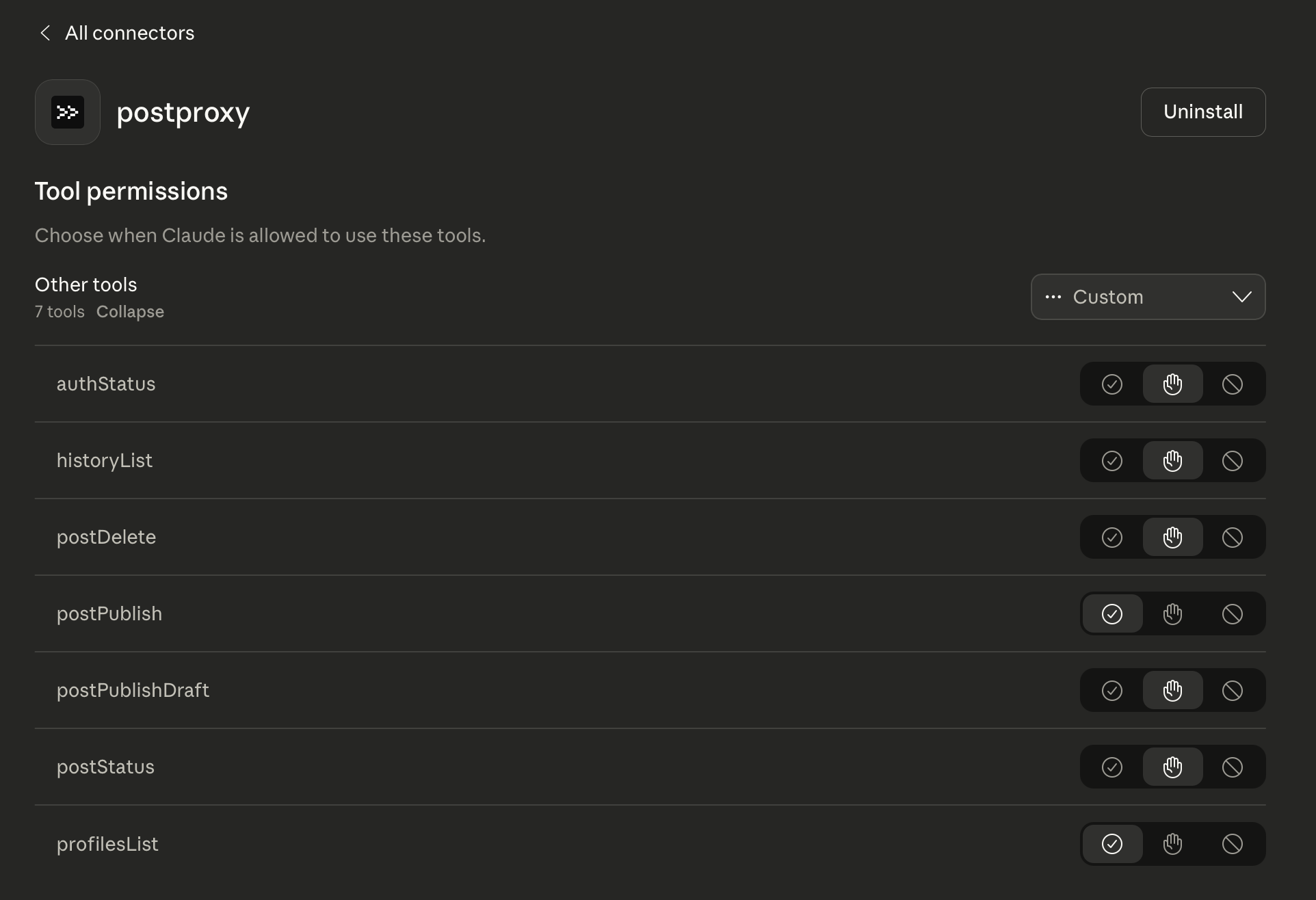
Our remote MCP server has seven tools:
- authStatus: Check if your connection is working
- profilesList: See which profiles you can publish to
- postPublish: Publish something now
- postPublishDraft: Save for review later
- postStatus: Check what happened after publishing
- postDelete: Remove something you published
- historyList: See your recent publishing activity
These aren’t just thin wrappers around API calls. They’re designed to give agents the context they need to make good decisions.
An agent can check your publishing history to avoid posting the same thing twice. It can verify auth before doing work. It can save a draft when it’s uncertain, or publish directly when it’s confident.
Agents work better when they can see what’s actually happening, not just fire off commands and hope.
Why remote matters
Local MCP servers work great for personal workflows. But infrastructure needs to be reachable from wherever your systems happen to be running.
Remote MCP gets you:
- Nothing to install on each machine
- Same behavior everywhere
- Authentication handled in one place
- Updates roll out once, work everywhere
- Whole team uses the same setup
Postproxy already acts like infrastructure. Remote MCP makes connecting to it feel the same way.
Less friction, not more features
We didn’t build remote MCP to add something new. We built it to remove an annoying obstacle.
Publishing infrastructure shouldn’t need local setup. It shouldn’t be stuck on one machine. It shouldn’t require installation every time someone new wants to use it.
Remote MCP removes all that. The infrastructure is just there, ready for whatever needs it.
That’s how it should feel.
What comes next
The use cases we’re most curious about are the ones we haven’t thought of yet.
They’re the ones that show up when publishing stops being a separate thing to deal with. When an agent in any environment can just access Postproxy without someone having to write custom integration code first.
When publishing works like infrastructure, people start using it like infrastructure.
We’re looking forward to seeing what that looks like.
Want to try it? Connect to https://mcp.postproxy.dev/mcp with your API key. Works with Claude Code, n8n, or any MCP-compatible client.
Postproxy
One API for every social platform
Publish to Instagram, X, LinkedIn, TikTok, YouTube and more with a single request. Free plan, no credit card required.
