
Postproxy MCP

Publishing as a native capability for AI agents

Use Postproxy via Model Context Protocol (MCP) to publish content directly from Claude Code, terminals, and automated workflows. One stable publishing layer for headless, automated execution.

Choose how you connect

Use Postproxy MCP as a hosted remote server (no install) or run the npm package locally — same tools, your choice.

Fastest setup

Remote MCP — zero install

Point your client at our hosted MCP endpoint. Replace YOUR_KEY with your Postproxy API key (query param or X-Postproxy-API-Key header).

Claude Code

Terminal window
claude mcp add --transport http postproxy \
https://mcp.postproxy.dev/mcp?api_key=YOUR_KEY
On your machine

Local MCP — npm package

Install with Node.js 18+ and register stdio transport. Best when you want the server only on your machine or air-gapped workflows.

Terminal window
npm install -g postproxy-mcp
claude mcp add --transport stdio postproxy-mcp \
--env POSTPROXY_API_KEY=your-api-key \
--env POSTPROXY_BASE_URL=https://api.postproxy.dev/api \
-- postproxy-mcp

Publish directly from Claude Code

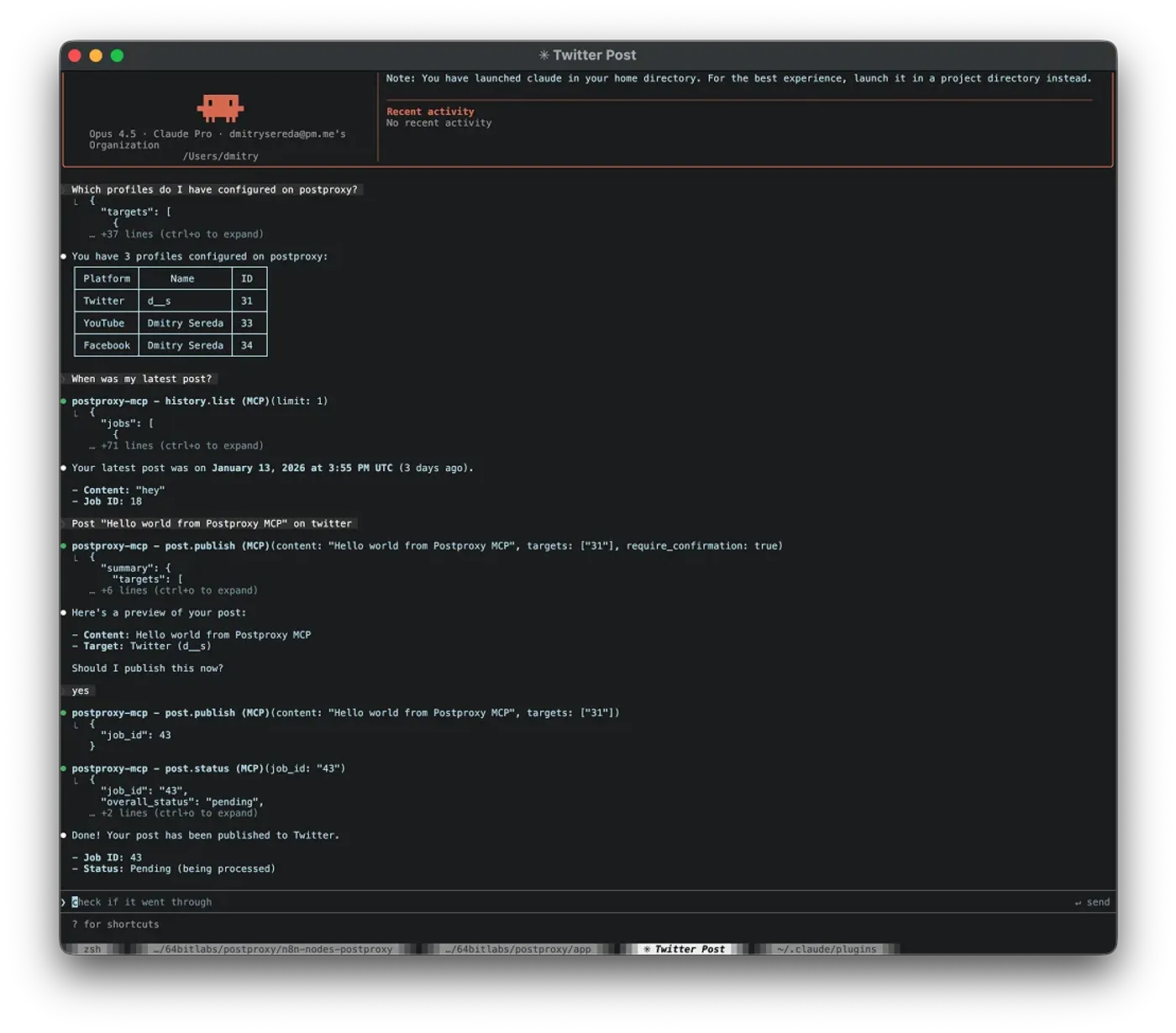
Postproxy can be used as a native MCP tool inside Claude Code. Ask an agent what to publish, confirm the action, and let Postproxy handle execution and retries.

Postproxy MCP session in Claude Code

What this example shows

  • The agent lists available Postproxy profiles
  • User requests to publish a post
  • Postproxy publishes the post and returns a post ID
  • Agent exposes publish status — all from the terminal

Agents decide what to publish.
Postproxy executes it reliably.

Why MCP matters for automation

Automation is moving beyond scripts and dashboards.

Modern workflows are agent-driven: LLMs reason, decide, and execute actions across systems.

MCP is the execution layer that makes this possible. Postproxy turns publishing into a reliable capability agents can call through one stable contract.

Publishing sits alongside other automated, observable workflows in real systems.

What you can automate

Rocket

Release updates

Publish release announcements directly from notes or changelogs without switching tools.

Git

Pull request & deploy summaries

Turn recent changes or deployments into short, publishable updates automatically.

Evernote

Research → posts

Convert research notes, articles, or ideas into concise posts while you're still thinking about them.

Notion

Writing → publish

Stay in your writing flow and publish finished text directly, without dashboards or schedulers.

Google Calendar

Daily status updates

Turn daily logs or task summaries into consistent public or internal updates.

Lightning

Idea capture → scheduled posts

Turn quick notes into scheduled posts so ideas don't die in your drafts folder.

Ready to get started?

Start with our free plan and scale as your needs grow. No credit card required.