Your AI already knows your business. Now let it help you with your front desk.
Café, salon, small shop: messages sit in four apps and your Google listing is out of date. Postproxy MCP puts messages, posts, and your Google Business Profile into the Claude or ChatGPT chat you already use.
Postproxy MCP connects Claude or ChatGPT to your Facebook, Instagram, WhatsApp, and Google Business Profile. The assistant you already talk to can read and answer customer messages, write and publish posts, and update your listing — all in one chat, and only when you ask it to.
Five tabs before coffee
If you run a café, a salon or a small shop, some of this will sound familiar. Customer messages are spread across Facebook, Instagram and WhatsApp, so some get answered hours late. Your Google listing still shows last summer’s hours. Instagram gets a post whenever there’s a quiet minute. Every app now has an AI button, and none of them know the first thing about your business. And every tool that promises to help is one more thing to learn.
You’re juggling Meta Business Suite, WhatsApp, Google Business Profile and a scheduler you haven’t opened since spring, and you’re also the one making the coffee.
That’s the problem we wanted to fix with Postproxy MCP. Instead of giving you yet another app, it puts all of this into a conversation with Claude or ChatGPT, which a lot of owners already have open anyway.
Your AI already knows you
Every social tool has added an AI button by now. It’ll write a caption or suggest a reply, but it has no idea who you are. It doesn’t know your prices, your regulars, or that you always sign off with a smiley.
But your ChatGPT or Claude actually can know that. You’ve probably told it about your menu, pasted in your price list, and asked it to fix an awkward email to a supplier. It knows how you talk. It just couldn’t do anything outside the chat.
Postproxy connects it to your accounts through MCP, which is basically a plug that lets AI assistants use other tools. Once it’s set up, the same assistant can read and answer your messages, publish posts and update your Google listing. Same assistant, same context, now with access to your channels.
8:00 — “What came in overnight?”
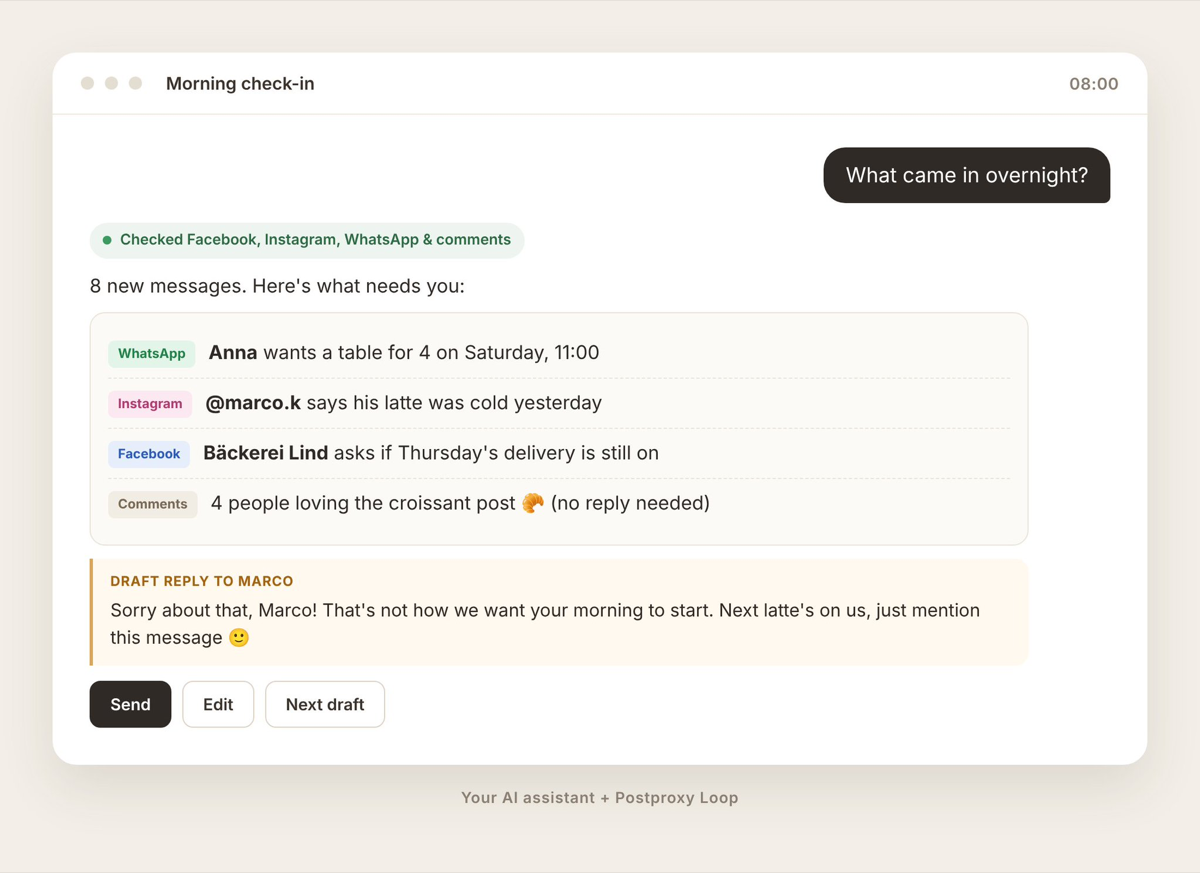
You type “what came in overnight?” and your assistant goes through your Facebook, Instagram and WhatsApp messages, plus the comments on your posts. Then it tells you what’s there: two people want a table on Saturday, someone’s unhappy their latte was cold, your supplier is asking about Thursday, and four people just really like the croissants.
It drafts replies that sound like you, because it knows how you talk. The booking gets your real hours. The latte person gets a sorry and a coffee on the house next time, if that’s what you’d do. And if someone asked something awkward in public under a post, it can take the conversation to a private message.
Nobody means to reply slowly. It just happens when your inbox is spread across four apps and you’re behind the counter all day. Having it in one place won’t give you more hours, but it makes ten minutes enough.
12:00 — “Post today’s special”
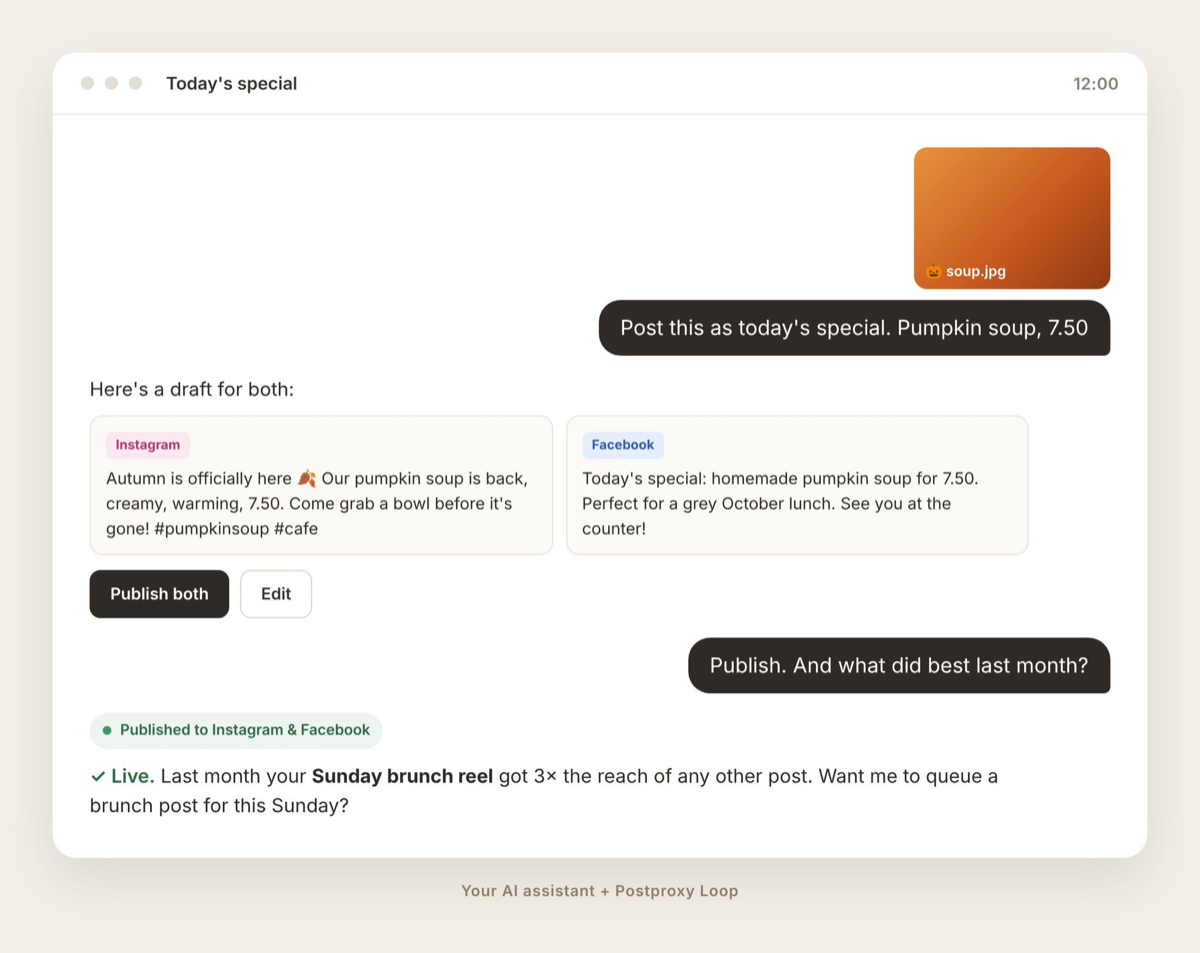
The pumpkin soup came out great, so you take a photo and ask your assistant to post it. It writes the caption, tweaks it a little for Instagram and Facebook, and posts to both.
While you’re at it, you can ask it to plan a few posts for next week about the autumn menu, or ask what worked best last month. Maybe it turns out the Sunday brunch video beat everything else, and now you know what to make more of.
None of this is new on its own. Plenty of tools can schedule posts. The difference is that it happens in the same conversation where you just answered your messages, with an assistant that already knows your business.
17:00 — “We’re closed on the 3rd”
Here’s the one I think people underestimate. When someone looks for a café nearby, your Google Business Profile is often the very first thing they see, before your website or your Instagram. And for a lot of businesses it’s quietly out of date.
Holiday hours nobody updated mean someone walks up to a locked door. The menu still lists the dish you stopped making last year. The photos are from the week you opened. Everyone knows this stuff matters. It’s just never urgent enough to go and log in.
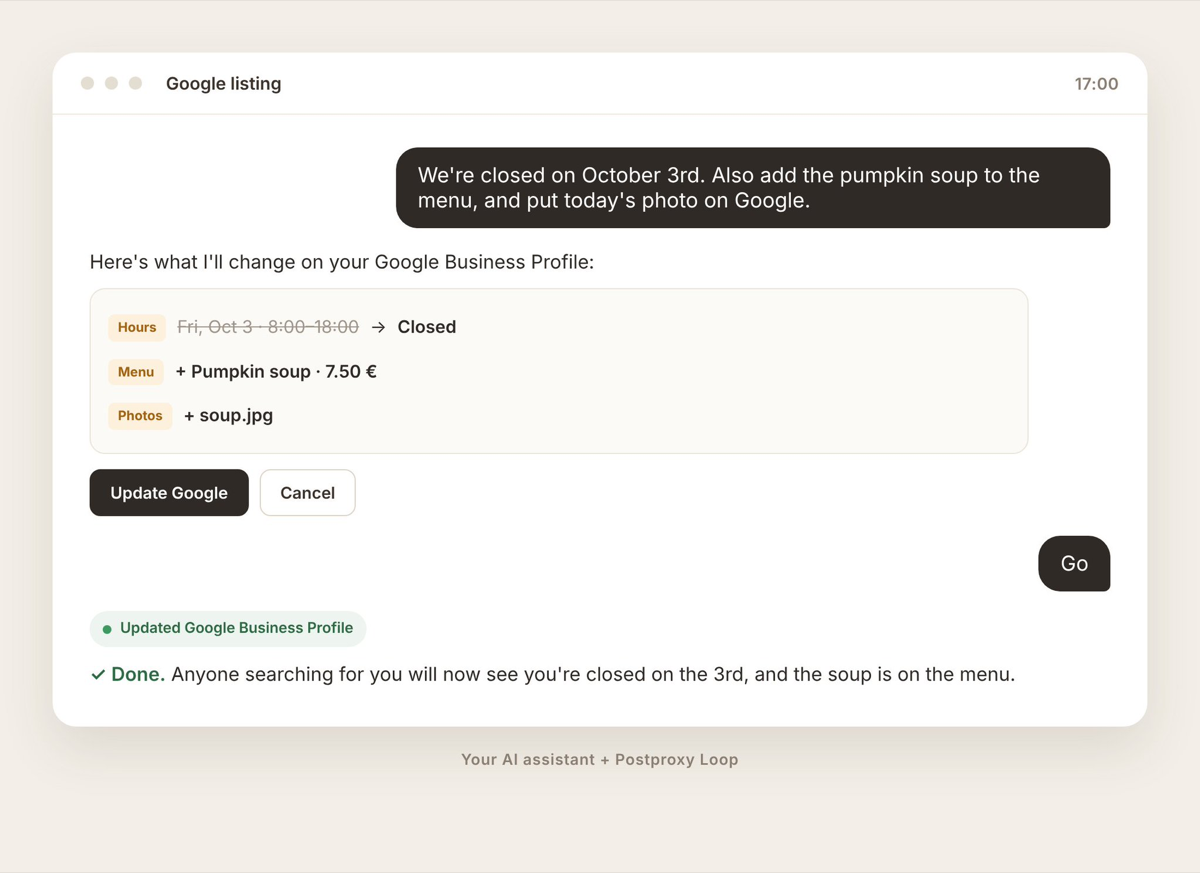
With Postproxy MCP, you just say it. “We’re closed on October 3rd.” “Add the pumpkin soup to the menu, 7.50.” “Put today’s photos on Google too.” It takes about as long as texting a friend, so it actually gets done.
You stay in charge
The obvious worry is: what if it says something strange to a customer? Fair. I’d worry about that too.
It doesn’t run by itself. There’s no bot working in the background while you sleep. It only does something when you ask, and you can have it show you every reply and every post before it goes out. You read it, change a word if you want, and then say send.
It’s more like having someone next to you who types really fast. You’re still the one deciding what gets said.
Nothing new to learn
A lot of business owners already use ChatGPT or Claude for something, even if it’s just rewording emails. Postproxy doesn’t ask you to learn a new dashboard or remember another password. It just lets the thing you already use do a bit more.
Messages, posts, your Google listing. One conversation, with an assistant that already knows how you run things.
If you want to try it, you can connect Postproxy MCP to Claude or ChatGPT. Tomorrow at 8, try one question instead of five tabs and see how it feels.
Postproxy
One API for every social platform
Publish to Instagram, X, LinkedIn, TikTok, YouTube and more with a single request. Free plan, no credit card required.