





















A weekly schedule, set once
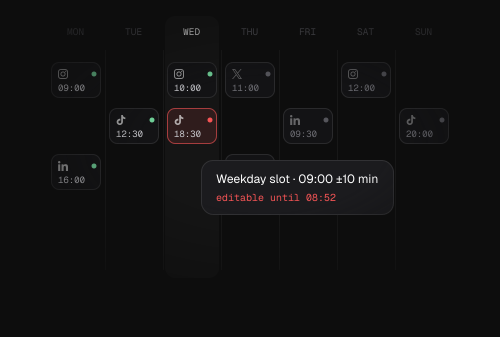
Define slots by day and time in your timezone. Every new post takes the next open slot, so you fill the calendar without picking times by hand.
Define your weekly slots in any timezone, drop posts into the queue, and Postproxy fills the next open one. Priority keeps the important posts first, jitter keeps the timing human, and the whole queue rearranges itself whenever anything changes.
Recurring slots, priority ordering, and timing that stays human.
Define slots by day and time in your timezone. Every new post takes the next open slot, so you fill the calendar without picking times by hand.

A jitter of 0 to 60 minutes shifts each post by a few minutes either way, so a 09:00 slot fires anywhere from 08:50 to 09:10 and never looks automated.
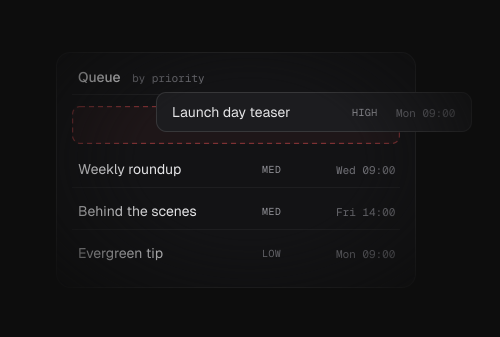
Add or remove a post, move a slot, change the timezone, or unpause, and every scheduled time is recomputed. Higher-priority posts take the earliest slots, oldest first.
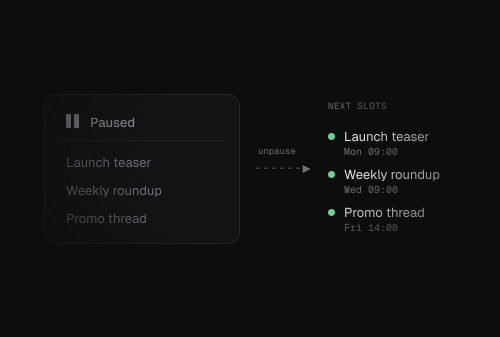
A paused queue holds everything in place. Unpause and any past-due posts roll forward into future slots instead of firing all at once.
Define the slots once, add posts with a priority, and ask for the next open slot whenever you need it.
$ curl -X POST "https://api.postproxy.dev/api/post_queues" \
     -H "Authorization: Bearer $API_KEY" \
     -H "Content-Type: application/json" \
     -d '{
       "profile_group_id": "pg123",
       "post_queue": {
         "name": "Morning Posts",
         "timezone": "America/New_York",
         "jitter": 10,
         "queue_timeslots_attributes": [
           { "day": 1, "time": "09:00" },
           { "day": 3, "time": "09:00" },
           { "day": 5, "time": "14:00" }
         ]
       }
}'{
"id": "q1abc",
"name": "Morning Posts",
"timezone": "America/New_York",
"enabled": true,
"jitter": 10,
"profile_group_id": "pg123",
"timeslots": [
{ "id": 1, "day": 1, "time": "09:00" },
{ "id": 2, "day": 3, "time": "09:00" },
{ "id": 3, "day": 5, "time": "14:00" }
],
"posts_count": 0
}$ curl -X POST "https://api.postproxy.dev/api/posts" \
-H "Authorization: Bearer $API_KEY" \
-H "Content-Type: application/json" \
-d '{
"post": { "body": "New guide is live" },
"profiles": ["twitter", "linkedin"],
"queue_id": "q1abc",
"queue_priority": "high"
}'{
"id": "post_abc123",
"body": "New guide is live",
"status": "scheduled",
"queue_id": "q1abc",
"queue_priority": "high",
"scheduled_at": "2026-03-11T14:07:00Z"
}$ curl "https://api.postproxy.dev/api/post_queues/q1abc/next_slot" \
-H "Authorization: Bearer $API_KEY"{
"next_slot": "2026-03-11T14:00:00Z"
}View the full Queues reference, with timeslots, jitter, and priority
View documentationHow slots and priority work, what jitter does, when the queue rearranges, and pausing.
A queue has recurring weekly timeslots, each a day and a time in its timezone. Add a post with a queue_id and it takes the next open slot. Higher-priority posts are placed first, and within a priority the oldest post goes earlier.
Jitter is a random offset of 0 to 60 minutes applied to every scheduled time. With jitter set to 10 and a 09:00 slot, a post fires somewhere between 08:50 and 09:10, so your timing looks natural instead of firing on the exact second.
Automatically, whenever you add or remove a post, add or remove a timeslot, change the timezone, or unpause the queue. You never recompute scheduled times yourself.
Pass queue_priority as high, medium, or low when you add the post. High grabs the earliest available slot, low fills what is left, and posts at the same priority are ordered oldest first.
Set enabled to false and nothing publishes. When you unpause, posts that became past-due while paused are rolled forward into future slots rather than sent all at once.
A queue is connected to a profile group and schedules across the profiles in it. A single post can still target several profiles, like twitter and linkedin, in one call.
Set your weekly slots, drop posts into the queue, and let Postproxy handle the timing, the spacing, and the jitter.
